Looks ahead
Checks the conditions at your location for the coming hours.
AstroStation · What it does
AstroStation looks at the coming hours and combines cloud cover, temperature and wind. The touchscreen immediately shows whether and when conditions will be favourable enough to set up your telescope.
No separate charts to interpret yourselfOne clear answer and the best observing window.
Checks the conditions at your location for the coming hours.
Presents cloud cover, temperature and wind in one clear overview.
Shows whether conditions are favourable and which time window is best.
The three core screens
ASTRO helps you choose the right moment, MOON adds context about the available dark window and PLAN helps determine what you can observe.
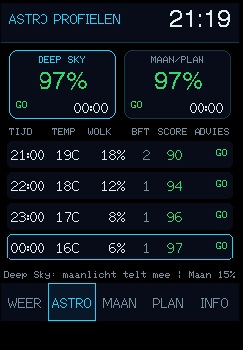
Tracks conditions hour by hour and uses a score to show when the best period begins.
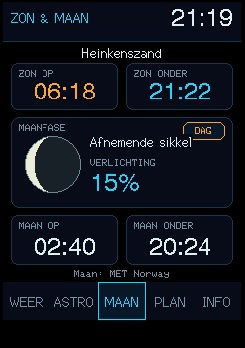
Combines solar data, the lunar phase and moon window so you can quickly assess the available dark time.
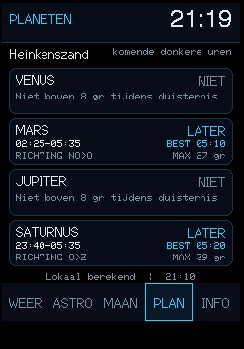
Shows when each planet can be observed and helps you choose a suitable target for the evening.
The development story
Project Polaris is not a ready-made product concept. Firmware, electronics and enclosure evolve together by building real prototypes and testing every detail in practice.
Unfinished elements are deliberately identified as such below.Preparing for an observing session meant checking and interpreting weather forecasts and astronomical information separately. Polaris therefore began with one practical question: will the next few hours be good enough to set up the telescope?
On the 2.8-inch ESP32 touchscreen, the software evolved into five connected screens: WEATHER, ASTRO, MOON, PLAN and INFO. The current firmware is 3.0 alpha 9.4.40. This is the stable firmware version currently used as AstroStation's foundation.
The board, display, USB cable and light sensor were measured before the enclosure was modelled in Fusion 360. Several test prints helped determine the correct touch clearance, PCB mounting, ventilation, cable routing, service opening and fixed 26° viewing angle.
The enclosure CAD design is complete for this phase, printed and mounted on the fixed stand. The emulator provides accurate screenshots for the website and user manual 1.3 for 3.0 alpha 9.4.40. The complete prototype works; longer practical testing comes next to keep validating the stable firmware base in a wider range of conditions.
Current status